Free for Windows · No account · Nothing uploaded
Point.Snap.Paste.
Press Alt+Z and drag over anything on your screen. It’s on your clipboard before you let go, ready to paste into a chat, an email, a ticket or an AI.
Windows may say it protected your PC. Click More info, then Run anyway. Signed builds arrive with the Store release.
Windows 10 and 11. Coming to the Microsoft Store.
The problem
Don’t describe it. Snap it.
One picture beats a paragraph. Half of “can you help me with this?” is describing a screen in words. It’s slow for you, and it’s guesswork for whoever’s reading.
How it works
Three seconds, start to paste.
No window to open, no file to save, no folder to dig through. The next thing you press after letting go is Ctrl+V.
A 402 here usually means the saved card expired. Open Billing › Payment methods and…
Recent captures
Took five? Send all five.
Press Alt+Shift+Z for your latest captures. Click the ones you want, hit Copy, and paste them in the order you took them.
Every capture is also saved in one folder, numbered in order, so the newest is always on top and nothing gets lost.

Who it’s for
Anyone who’s ever said “it’s the thing on the left.”
“Can you look at this?”
Teammates
Show the bug, the number or the button. Skip the meeting.
“What does this error mean?”
AI chats
Paste the screen into ChatGPT, Claude or Copilot and ask.
“Which one do I click?”
Family
Help your parents from across the country with one picture.
“It worked yesterday.”
Support
Customers, tickets and help desks get the screen, not a story.
One hand
Both keys sit under your left hand, so your right hand stays on the mouse. Let go, and it’s already on your clipboard.
Exact
The loupe lands you on a one-pixel edge. Every monitor is captured at its real resolution.
Uploads
No account, no cloud, no ads. Your screenshots stay on your PC.
The Home window
Everything in one window.
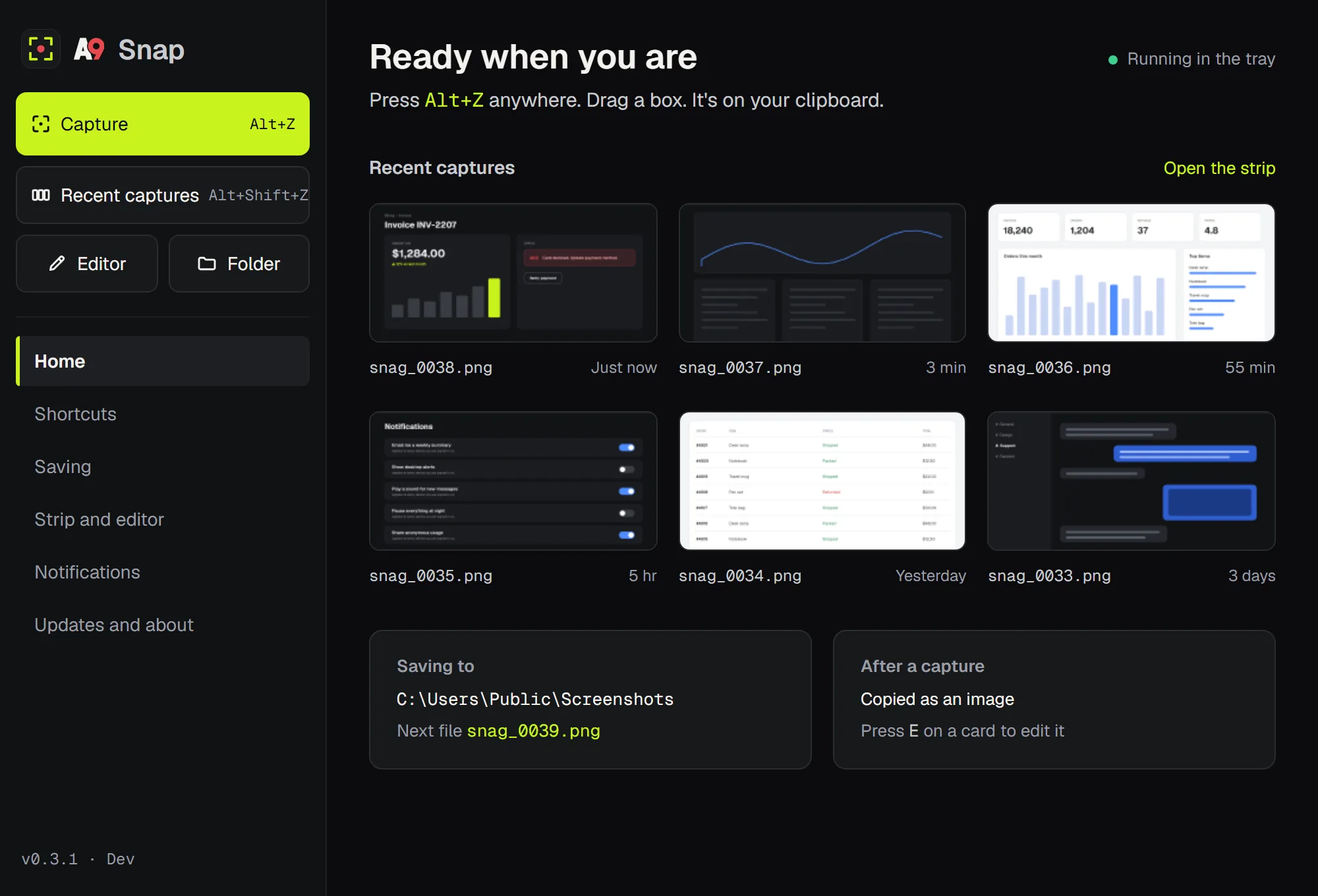
Capture, recent captures, the editor and your folder, each showing your own hotkey. Your six newest captures sit right there, and every setting is one click away.
The editor
Point at it. Then send it.
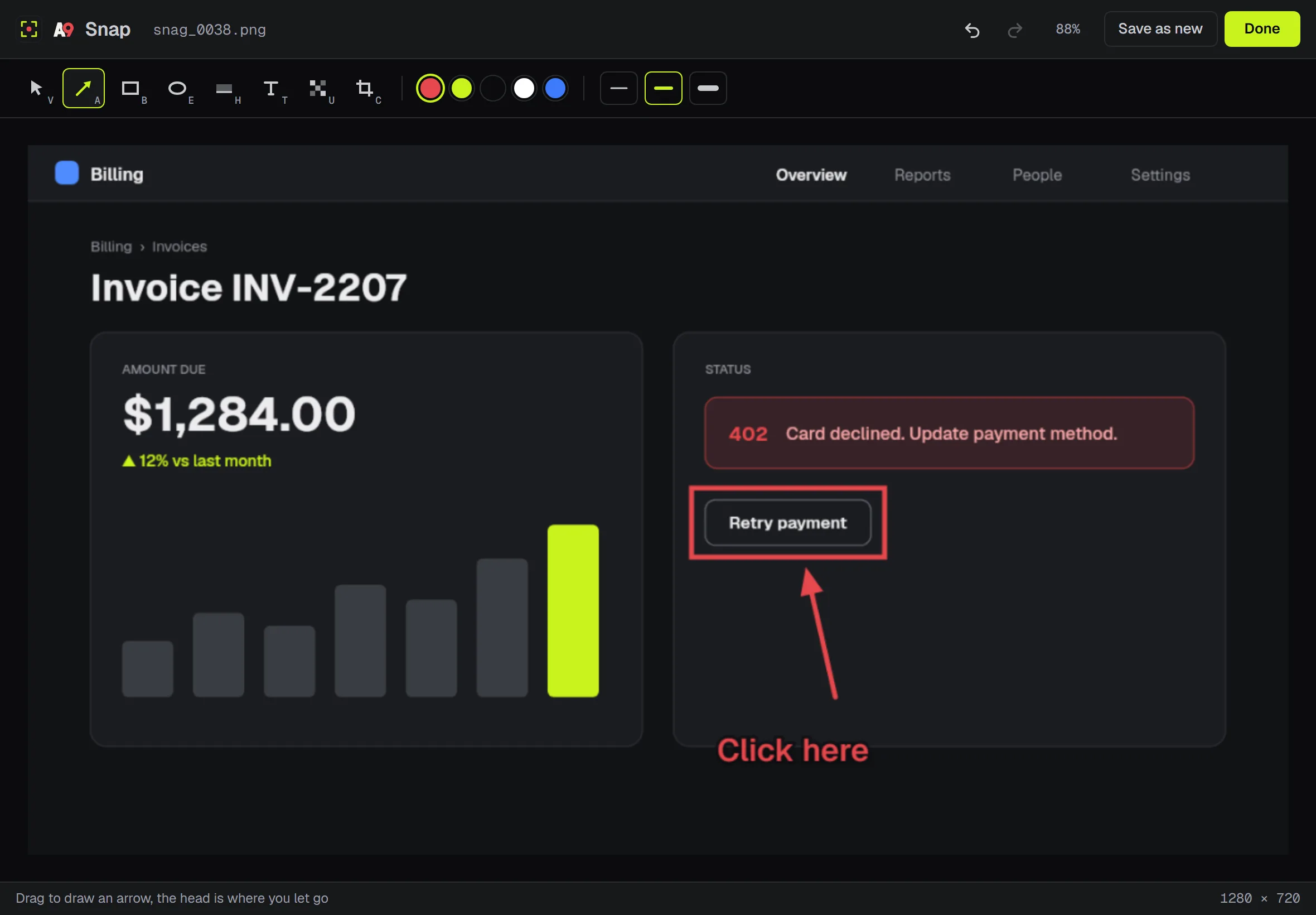
An arrow, a box, two words, a blur over the private bit. Every tool you need to point at something, and nothing you don’t.
The honest table
Already have a screenshot tool?
Windows comes with one, and it does a lot. A9 Snap does less, faster. Here’s the difference.
| A9 Snap | Windows Snipping Tool | |
|---|---|---|
| Start a capture | Alt+Z, one hand | Win+Shift+S, or Print Screen |
| Copied when you let go | Yes | Yes |
| Saved automatically | Always, numbered, in the folder you pick | Yes, to your Screenshots folder |
| Pixel loupe while you drag | Yes, 8× | No |
| Copy your last few at once | Yes | One at a time |
| Arrow, box, text, blur | Yes, plus highlight and crop | Pen, highlighter and shapes. No blur. |
| Screen recording | No | Yes |
| Price | Free | Free with Windows |
Snipping Tool features from Microsoft’s published guide, checked October 2026.
Switching from another tool?
Your numbers come with you.
Point A9 Snap at the folder you already use. It reads your highest number and keeps counting in the same style, so the newest screenshot stays on top.
The A9 family
Say it with Voice. Show it with Snap.
A9 Voice types what you say into any app and takes meeting notes with no bot in the call.
Questions
Short answers.
Is it really free?
Yes. Capture, the loupe, numbered files, recent captures and the editor are free for good. No subscription, ever.
Does it send my screenshots anywhere?
No. Files go to the folder you pick. The only thing A9 Snap sends is a check for updates.
Is it safe to install?
Yes. Early builds aren’t signed with a Windows certificate yet, so Windows may say it protected your PC. Click More info, then Run anyway. Signed builds arrive with the Store release. There’s no account, and nothing leaves your PC except the update check.
Two monitors? 150% scaling?
Yes. Every monitor is captured at its real resolution, and the selection lands on the pixels you see.
Can I change Alt+Z?
Yes, in Settings. If another app already owns a shortcut, A9 Snap tells you instead of failing quietly.
Mac or Linux?
Windows 10 and 11 for now.
Point. Snap. Paste.